Once you’ve picked the right technology, such as a warehouse management system (WMS), the next big step is how you’ll handle the transition, more pragmatically, the cutover from your current software to your new application. Moving off a legacy platform and onto a newer solution isn’t something you “just schedule”. It takes careful, detailed planning to ensure the launch goes well. Cutover planning is a defined part of the overall deployment plan, and most operations are better served by a phased launch rather than a high-risk “big bang” switch. With a “big bang,” the warehouse flips the entire operation over in one step, which can easily create shipping delays, inventory errors, and a hit to productivity when you can least afford it. Common big bang problems include:
- Integration failures
- Order backlogs
- Too little time to fix configuration problems
- Inventory mismatches between systems (for example, WMS vs. ERP)
- Trouble narrowing down the real root cause of issues
- Incomplete employee training when the system is live
A phased rollout, on the other hand, shuts down the legacy software in stages, moves data in a controlled manner, and brings the new system online wave by wave. Breaking the transition into smaller steps helps managers maintain daily throughput while giving warehouse teams time to adjust to new screens, processes, and exceptions, reducing resistance along the way. Key benefits of a phased cutover include:
- Makes user adoption easier
- Helps protect customer service levels
- Allows teams to correct issues faster
- Keeps disruption contained
Still, holding continuity, accuracy, and customer satisfaction steady while swapping systems is tough. The best way to overcome the challenge is to build a realistic rollout plan that actually fits your target go-live date, and to avoid a few common misconceptions:
- Believing bad data and broken processes can be cleaned up 1–2 weeks before go-live
- Thinking operators can watch demos instead of running real workflows to prove readiness
- Assuming documented countermeasures or contingency plans aren’t needed ahead of go-live
- Assuming third parties will be ready without verification
- Betting on an unrealistic timeline just to match a desired go-live date
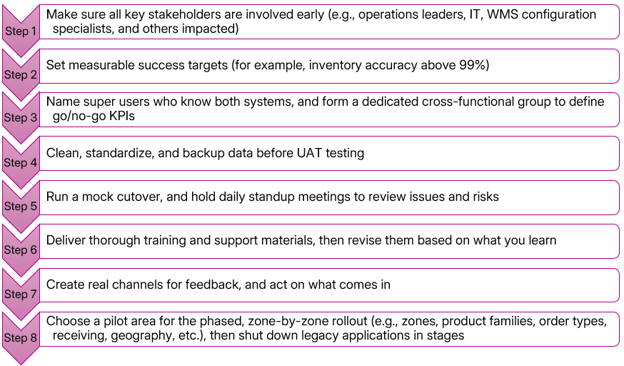
For a lot of warehouse leaders, the safest path is a phased, zone-by-zone cutover, basically limiting disruption as much as possible. Even something small, like a dropped order pool or a minor misalignment between systems, can quickly snowball into inventory problems or late shipments. For a period of time, teams often have to run the legacy system and the new WMS in parallel. Before you pick your pilot area or department, confirm your ERP can clearly identify which SKUs are controlled by the new system and which still sit in the legacy application. The ERP also needs to handle split order pools when a customer order contains items coming from both environments (legacy plus the new WMS). To keep the floor organized during that overlap, make it obvious where boundaries are. Use clear signage to mark inventory separation, and assign specific teammates to manage consolidation, packing, and manifesting so work doesn’t drift into confusion. A lot of launch-week failures trace back to readiness gaps no one caught during planning. To increase the ease of your transition and get the most out of the software you selected, take these steps:
Warehouse transformations are rarely simple. Even so, a phased cutover gives you more flexibility, more visibility, and more control while the change is happening. Since the goal isn’t just to go live, but to keep productivity and service levels intact, a phased plan helps teams catch issues early, confirm processes in real conditions, and protect customer SLAs. In practice, it’s one of the most reliable ways to reduce implementation risk.
—Ashley Rhodes, St. Onge Company