The capabilities described throughout this article represent what a well-designed procurement technology ecosystem can support. Depending on the organization’s systems, configuration, and process maturity, these activities may be managed through an ERP platform alone or through a combination of procurement, planning, warehouse, supplier management, and financial systems.
Effective procurement ensures you acquire the right goods and services, at the right price, from the right sources. For business leaders looking to streamline operations and control spending while mitigating risk and maximizing value, it’s crucial to understand the core steps of the procurement process. This is where having a robust enterprise resource planning (ERP) system in place comes in handy. An ERP automates tasks and provides real-time visibility. A powerful ERP system centralizes all inventory data, providing a single source of truth across the entire organization. Here is a breakdown of eight essential steps and strategies to optimize each one:
- Need Identification
When an internal team identifies a requirement for a product or service, the procurement process begins. This could be triggered by low inventory levels, a new project, or an upcoming contract renewal.
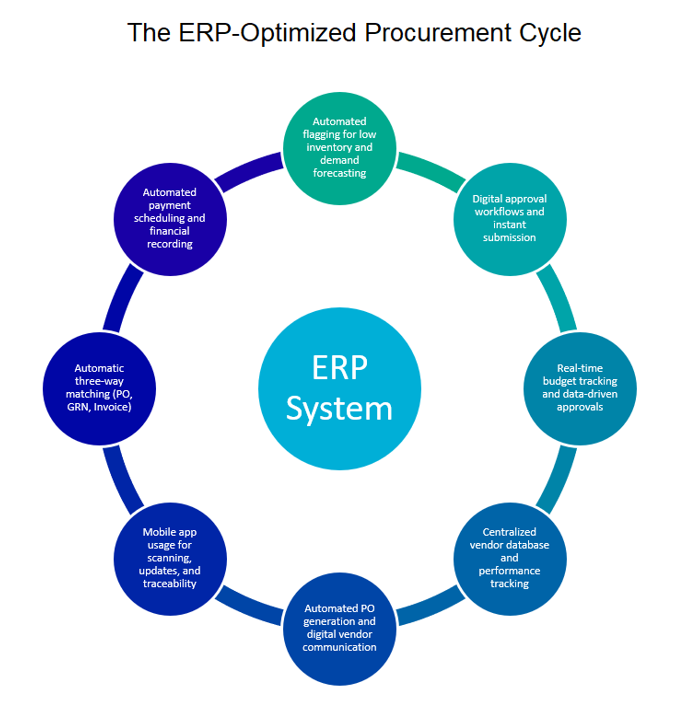
Optimization: Use the ERP functionality that automatically flags low inventory and generates a purchase request (PR) based on predefined thresholds and demand forecast to eliminate manual monitoring. Instead of relying on guesswork, you can predict what customers will buy and when, allowing for proactive stock levels. This ensures you have high-demand items ready without overstocking slow-moving products.
- Purchase Requisition (PR)
The purchase need is formalized into a purchase requisition document, which is submitted for internal approval. This ensures the request is necessary and within budget.
Optimization: Implement a digital approval workflow within the ERP. This routes PRs automatically to the correct decision-makers, speeding up approval times and ensuring adherence to internal policies.
- Review and Approval
The PR is reviewed by management and potentially fiancé to ensure it aligns with budgets and strategic goals. This step is key to preventing unnecessary spending.
Optimization: Leverage real-time budget tracking features in your ERP. Approvers can instantly see if the request will cause a budget overrun, allowing informed, data-driven decisions.
- Sourcing and Vendor Selection
Once approved, the procurement team identifies potential suppliers. This may involve a request for proposal (RFP) or request for quote (RFQ) process to compare options based on price, quality, and delivery times.
Optimization: Maintain a centralized vendor database in your ERP. The system can help manage vendor performance scores and contracts, making it easier to identify the best-fit supplier for each requirement.
- Purchase Order (PO) Creation
A formal purchase order is issued to the selected vendor, creating a legally binding contract detailing the items, price, terms, and delivery instructions.
Optimization: Automate PO generation directly from approved PRs. Digital Pos are instantly sent to vendors via the ERP, reducing manual data entry and minimizing errors.
- Goods Receipt and Inspection
The goods or services are delivered, inspected, and matched against the PO to confirm that the correct items were received in the expected condition.
Optimization: Advise the warehouse staff to use the mobile ERP applications. They can scan items upon receipt, instantly updating inventory levels and notifying the finance team that an invoice is likely forthcoming. This improves accuracy and traceability.
- Invoice and Approval (Three-Way Matching)
The vendor’s invoice is received and compared to the original PO and the goods receipt notice (GRN). This “three-way matching” is vital for financial accuracy.
Optimization: The ERP can automatically perform the three-way match. If all documents align, the invoice can be approved for payment without manual intervention, drastically reducing processing time and errors.
- Vendor Payment
The final step is the payment to the supplier according to the agreed-upon terms.
Optimization: The ERP can schedule automatic payments based on invoice approval dates and vendor terms, ensuring on-time payments, maintaining good vendor relationships, and potentially capturing early payment discounts.
By digitizing and streamlining these eight steps with an ERP system, your organization can move from a reactive, manual purchasing process to a strategic, automated procurement operation that delivers tangible bottom-line value.
—Ashley Rhode, St. Onge Company